Last updated: October 2026
- What is a hardware keylogger?
- Hardware keyloggers vs software keyloggers
- The main types of hardware keyloggers
- Inline USB and PS/2 loggers
- Keyboards with a logger built in
- Wireless keyboard sniffers
- Acoustic and other niche forms
- Why antivirus cannot detect a hardware keylogger
- Common myths about hardware keyloggers
- Where hardware keyloggers are usually found
- How to spot a hardware keylogger, step by step
- Step 1: Follow the keyboard cable end to end
- Step 2: Compare cable length and adapters
- Step 3: Check the list of USB devices
- Step 4: Look for unknown hubs and devices
- Step 5: Test with a keyboard you trust
- Step 6: Inspect the keyboard itself
- What to do if you find one
- How to prevent hardware keyloggers
- The bottom line
- Key takeaways
- Frequently asked questions
- Can antivirus detect a hardware keylogger?
- Where are hardware keyloggers most often found?
- How can I tell if a USB adapter is a keylogger?
- Does an on-screen keyboard stop a hardware keylogger?
- What should I do if I find a hardware keylogger?
- Can antivirus detect a hardware keylogger?
- Where are hardware keyloggers most often found?
- How can I tell if a USB adapter is a keylogger?
- Does an on-screen keyboard stop a hardware keylogger?
- What should I do if I find a hardware keylogger?
A hardware keylogger is a small physical device that records everything typed on a keyboard. It hides in the cable chain or inside the keyboard itself, so the computer never sees anything wrong.
This guide explains each type in plain words. You will learn how hardware keyloggers work, where they hide, and the exact checks that find one.
Quick answer: A hardware keylogger is a real device, not a program. It sits between a keyboard and a computer, or inside the keyboard, and saves every keystroke to its own memory.
Antivirus cannot find it because nothing is installed. Your best defence is a hands-on check of cables, adapters, and ports.
What is a hardware keylogger?
A hardware keylogger is a piece of electronics built for one job. It copies every key press on a keyboard and stores the record for later.
Most models look boring on purpose. Many look like a short adapter, a plug, or a normal part of the keyboard cable.
The person who planted it comes back later and collects the device, or reads the log through a hidden menu. Some newer models send the log over Wi-Fi, so the person never has to return.
The saved log is plain text in most cases. It shows words, passwords, and searches in the order they were typed, which is what makes the device so risky.
People use these devices on computers they own or manage, and a few use them to spy. Checking a computer you own or run is fine. Secretly recording another adult is a different matter, and the law treats it harshly in most places.
Hardware keyloggers vs software keyloggers
A software keylogger is a program or app. It runs inside the phone or computer and sends its log over the internet.
A hardware keylogger never touches the software at all. It watches the keys before the computer even receives them, which is why normal security scans miss it.
The trade-offs cut both ways. Hardware is harder to detect, but the planter needs physical access to the machine, and often needs access again to read the log.
Software is easier to install from a distance, yet it leaves traces that good security tools can find. Our roundup of the best keylogger for Android shows how the software side works.
| Point of comparison | Hardware keylogger | Software keylogger |
|---|---|---|
| Detection | No program to scan, so antivirus sees nothing | Can be flagged by antivirus and security scans |
| Install access needed | Physical access to the keyboard or ports | Access to the device, or a tricked install |
| Data storage | Memory chip inside the device itself | On the device, then sent over the internet |
| Removal | Find it and unplug it | Delete the app or program, or reset the device |
One point matters most. If you cannot find any software on a machine but your keys still seem exposed, think hardware and start checking cables.
The main types of hardware keyloggers
Hardware loggers come in a few shapes, and each shape hides in a different place. Knowing the shapes turns a vague worry into a short checklist.

The three main types are inline adapters, keyboards with a logger built in, and wireless sniffers. A few rare forms exist too, and they are covered briefly below.
Inline USB and PS/2 loggers
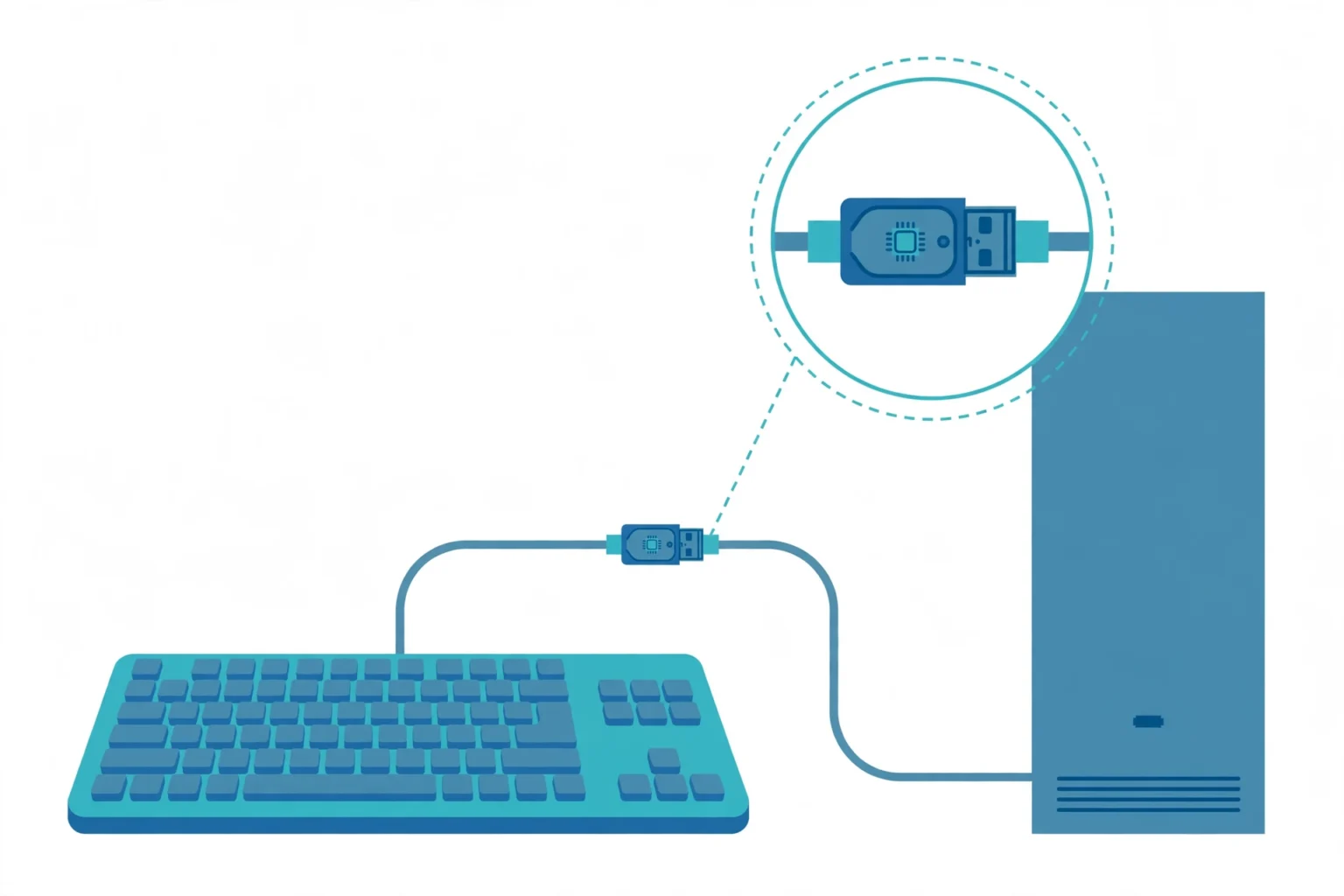
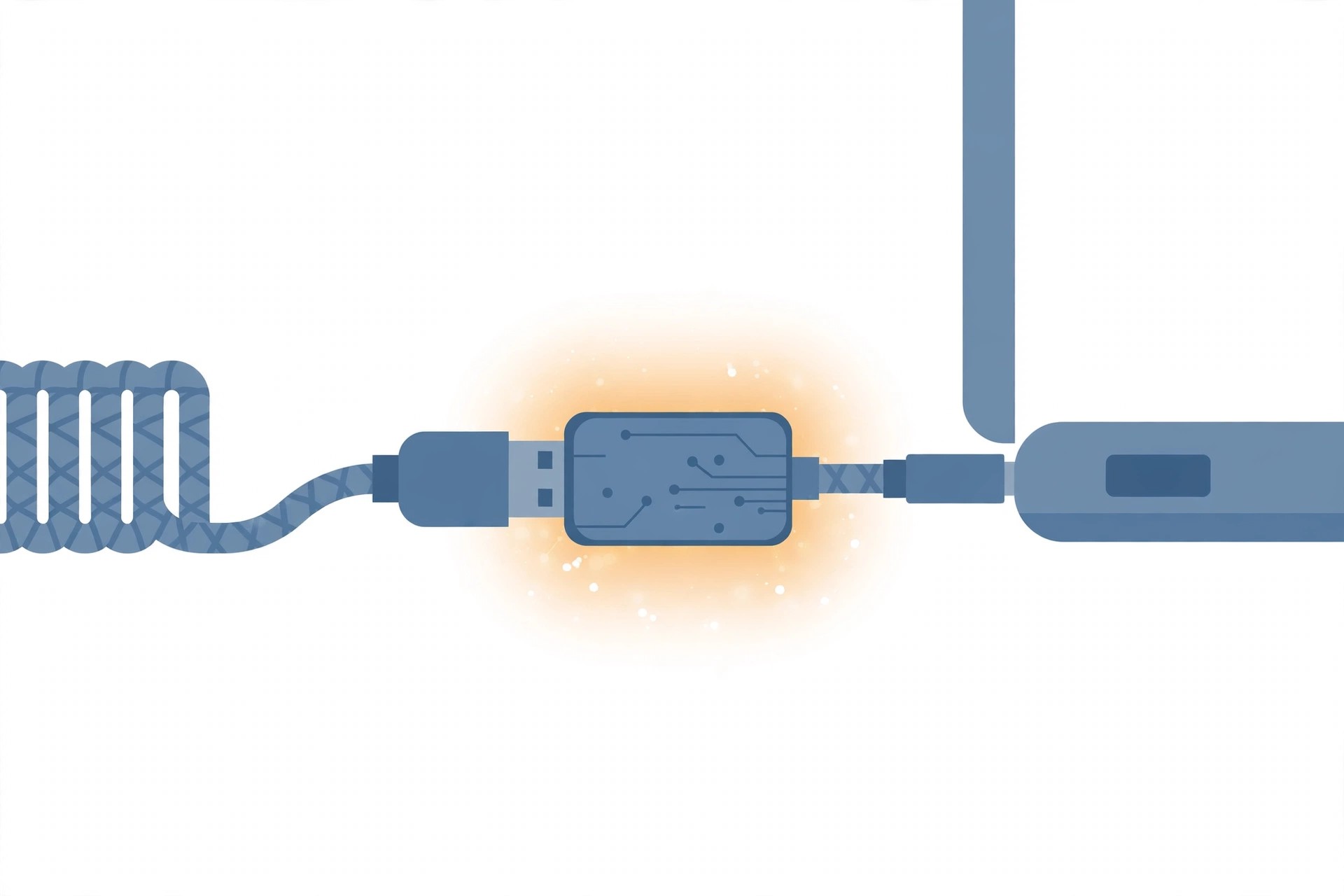
An inline logger is a small adapter that plugs into the computer. The keyboard cable then plugs into the adapter, so the device sits in the middle of the chain.
Every key press passes through it on the way to the computer. The device copies each press into its own memory chip and lets the signal pass, so typing feels normal.
Older models use the round PS/2 connector, while most current ones use USB. Storage sizes vary, and larger models can hold months of typing.
To read the log, the owner plugs the device into a computer and opens it with a password or a special key sequence. Some models have Wi-Fi and send the log by email, or show it on a small page the device hosts itself.
Keyboards with a logger built in
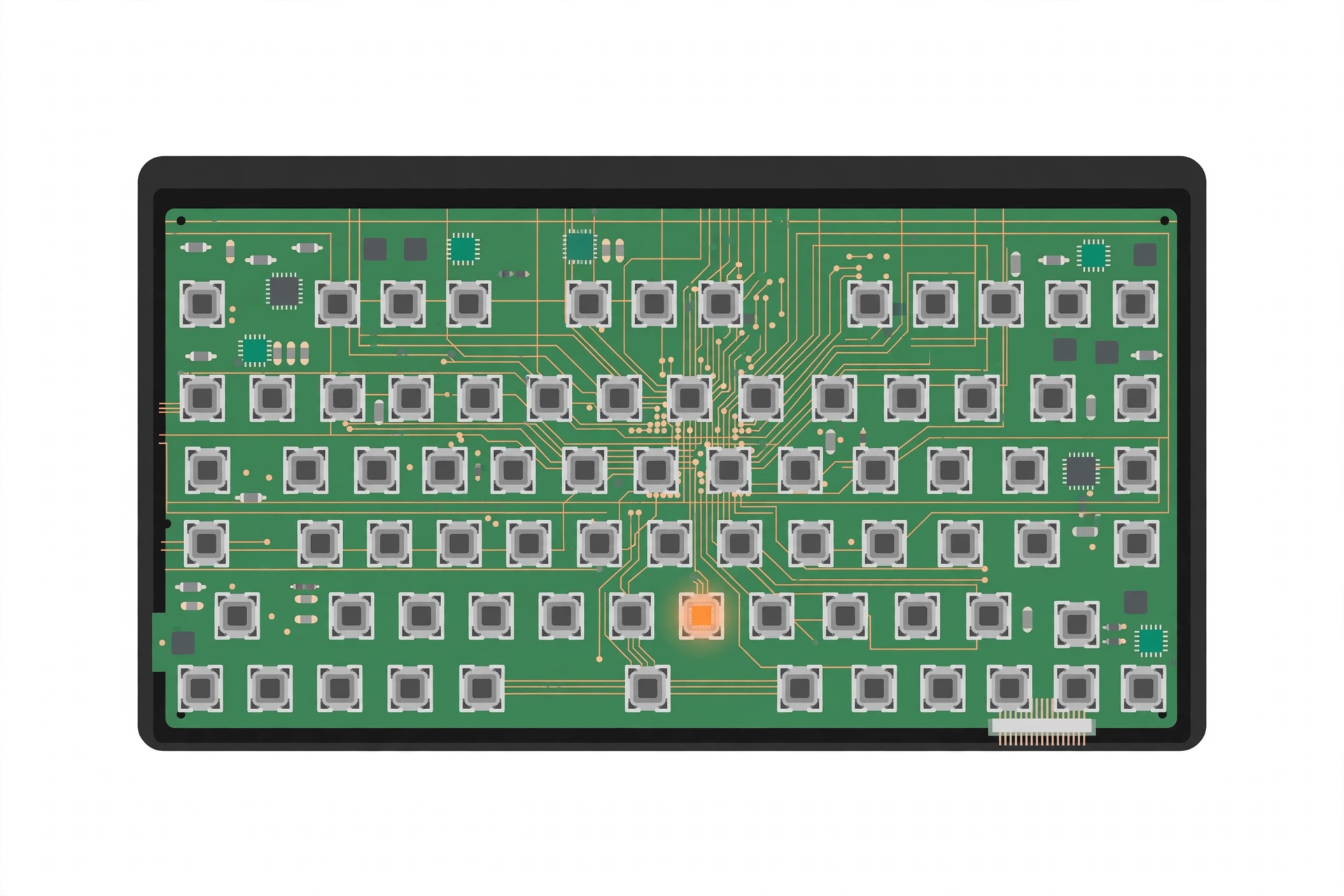
Some keyboards leave the factory with a logger inside, and a normal keyboard can also be modified. An extra chip on the circuit board records keys before they ever reach the cable.
From the outside, the keyboard looks and feels standard. There is no adapter to find, which makes this type the hardest to spot.
The clues are subtle. A swapped keyboard, a case that has been opened, or a keyboard that weighs a little more than an identical model can all point to a built-in logger.
Wireless keyboard sniffers
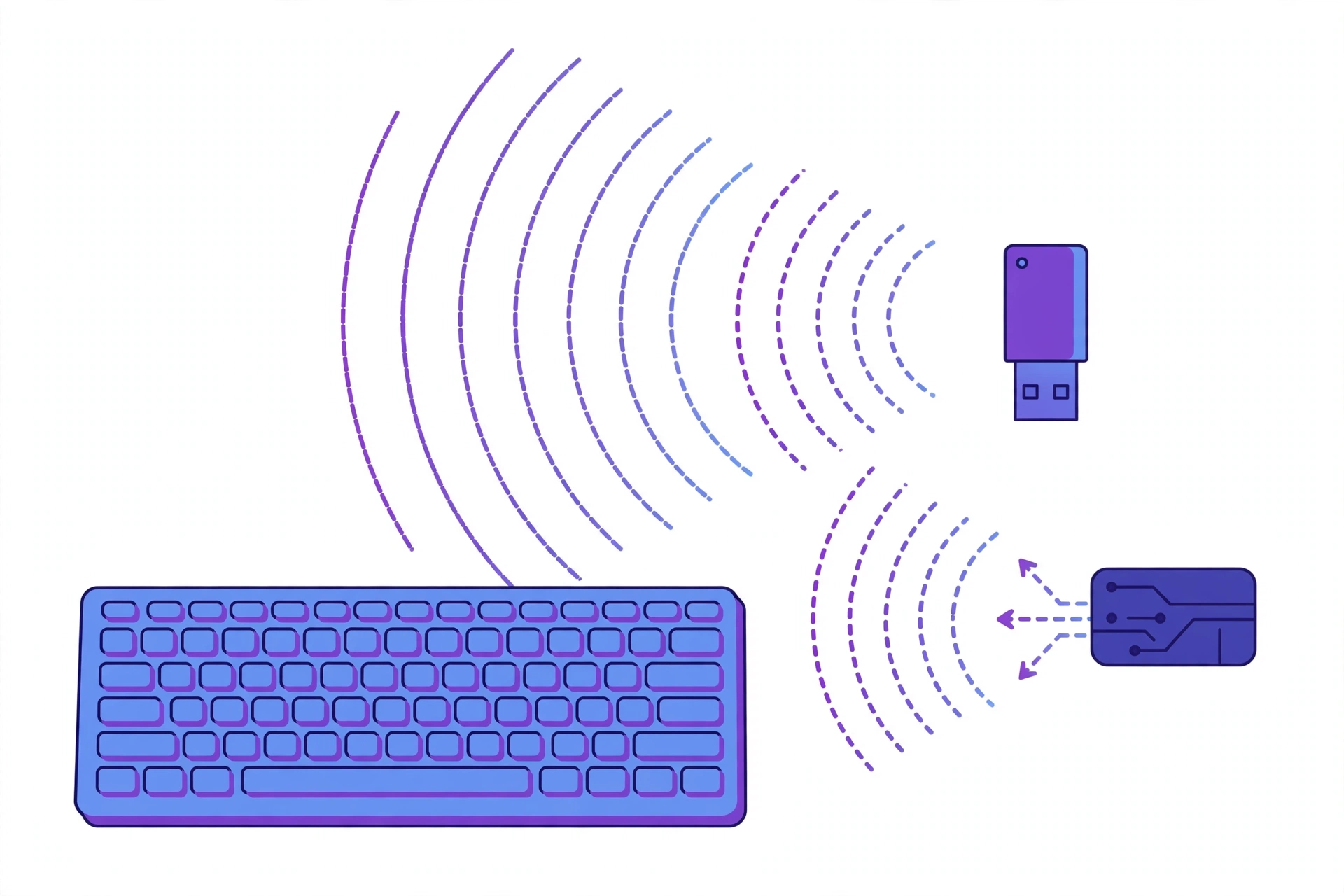
A wireless sniffer does not touch your keyboard at all. It is a small receiver that listens to the radio signals a wireless keyboard sends to its own receiver.
Cheap wireless keyboards send those signals with weak protection or none at all. Security researchers have shown that many budget models send keystrokes in plain form, so a nearby receiver can read them from across the room.
Good modern keyboards encrypt the link between keyboard and receiver. Encryption scrambles the signal, so a sniffer records noise instead of words.
Acoustic and other niche forms
A few niche methods exist, and they are rare in real life. Acoustic logging uses a microphone and software to guess keys from the sound each key makes.
Other research tools watch power use or radio noise that leaks from a wired keyboard. These methods need skill, gear, and a quiet setting, so they belong mostly in labs.
| Type | Where it hides | How to spot it |
|---|---|---|
| Inline USB or PS/2 adapter | Between the keyboard plug and the computer port | Follow the cable and count every connector |
| Built-in keyboard logger | Inside the keyboard case, on its circuit board | Compare weight and case seams, or swap the keyboard |
| Wireless sniffer | Nearby, often in the same room, with no contact | Hard to see; use an encrypted keyboard to block it |
| Acoustic logger | A microphone near the desk | Look for unknown mics and recording gear near the PC |
The pattern is simple. Every type needs a place to hide and a way to reach the keys, and both leave something you can check.
These devices are sold openly as tools for computer owners and IT teams. Legal sale is one reason they spread so easily, and it is also why a found device is not proof of a crime on its own.
Why antivirus cannot detect a hardware keylogger
Antivirus software scans files and programs. A hardware logger installs nothing, changes no files, and runs no program, so there is nothing for a scan to find.
The computer treats the device as part of the keyboard. It may appear in device lists as a generic USB device or hub, with a normal name and no warning.
Your operating system also trusts keyboard input by design. It cannot tell a real key press from one replayed by a device, so it accepts both.
Companies can add one layer of defence with USB device control. Such tools can block unknown devices, but home computers rarely use them, and a logger that pretends to be the keyboard can still slip past.
This is why detection here is physical, not digital. Our step-by-step guide on how to detect a keylogger covers the software checks too, so you can rule out both kinds.
Common myths about hardware keyloggers
Myth one says only spies and governments use these devices. In truth, they are sold in normal online shops, and many buyers use them on their own machines or on staff computers with notice.
Myth two says a new computer cannot be logged this way. Age gives no protection at all, because the device works on the cable, not on the age or brand of the machine.
Myth three says you would notice slower typing or odd behaviour. A simple inline logger adds no delay you can feel, and the machine behaves as it always did.
Where hardware keyloggers are usually found
Hardware loggers turn up where many people share one machine, or where one person wants to watch another. Shared access makes planting easy and discovery slow.
Offices and shared workstations are common spots, since many hands touch the same desk. Hotel business centres, school labs, libraries, and internet cafes carry the same risk.
Homes are not exempt. A shared family computer can be fitted with a logger, sometimes under the label of safety or control.
Second-hand and borrowed keyboards carry a small risk too. If a keyboard arrives from a source you do not trust, treat it like any other unknown device.
Treat any public or shared computer as watched. Never type banking or email passwords on a machine you do not control.
How to spot a hardware keylogger, step by step
You need no tools beyond a phone torch and ten quiet minutes. Work through these steps in order and check each link in the chain.

Step 1: Follow the keyboard cable end to end
Start at the keyboard and follow the cable with your hand to the computer. Note every plug, adapter, and join you pass on the way.
A normal setup has one cable and one plug. Any extra block, barrel, or box in the middle of the chain deserves a close look.
Step 2: Compare cable length and adapters
A logger adds length and bulk. If the cable looks longer than it should, or a connector looks thicker and heavier than a plain plug, treat it as suspect.
Compare with a cable you know is clean, side by side if you can. Genuine adapters for old PS/2 keyboards exist, so check labels and ask the owner before you accuse anyone.
Step 3: Check the list of USB devices
On Windows, open Device Manager and expand the keyboard and USB sections. On a Mac, open System Information and read the USB tree.
Count the devices and match each one to real hardware you can see. The same habit keeps phones safer too, where a regular review of app permissions shows which apps can see too much.
Step 4: Look for unknown hubs and devices
An inline logger may show up as an extra hub or a second keyboard entry. Unplug the keyboard and watch which entries vanish, then plug it back in and watch what returns.
If more entries return than the keyboard alone explains, something else sits in the chain. Repeat the test with a short, plain cable if one is available.
Step 5: Test with a keyboard you trust
Swap in a keyboard that only you have handled, ideally a new one. Use the machine for a day and note whether anything odd follows, like accounts acting up.
This test is not proof on its own. It does, though, remove a built-in logger from the chain in one move.
Step 6: Inspect the keyboard itself
Pick up the keyboard and check the case. Look for seams that no longer sit flush, screws with fresh marks, or labels that hide a screw hole.
Weigh it against an identical model if you can find one. An extra chip adds only a little weight, but a clear gap is one more reason to swap the keyboard out.
If every check comes back clean, the risk drops a lot. No home check can promise zero risk, yet a logger with nowhere to hide rarely survives these six steps.
What to do if you find one
Stay calm and stop typing secrets on that machine at once. Every key you press may still be recorded, including the passwords you are about to change.
If a crime is possible, treat the device as evidence. Photograph it in place, note the date and who had access, and avoid wiping or opening it.
Tell your IT team at work, or the police if the machine is yours and the act looks criminal. Our guide on whether keyloggers are legal explains which uses cross the line.
If the machine belongs to a hotel, school, or cafe, tell the manager in writing. A written note creates a record and pushes the owner to check their other machines too.
Change your passwords from a clean device you trust, starting with email and banking. Turn on two-factor authentication as you go, since it limits the damage from any stolen password.
How to prevent hardware keyloggers
Prevention is mostly habit. A thirty-second look at your ports each week beats any tool you can buy.
Choose wireless keyboards with strong encryption, and prefer known brands that state it clearly. A wired keyboard from a trusted source removes the sniffing risk entirely.
Buy keyboards from sellers you trust and check the seals on the box. A returned or resealed keyboard deserves the full six-step check before you use it for work.
Keep cables tidy and visible. Cable trays and port covers make new adapters stand out, and port blockers raise the effort needed to plant one.
An on-screen keyboard can help for a single password, because it sends clicks, not key presses, so an inline logger sees nothing. It is slow, though, and screen-recording software can still capture it, so treat it as a small trick, not a fix.
Two-factor authentication is your damage control. Even if a logger steals a password, a second code keeps most accounts safe.
The bottom line
Hardware keyloggers beat software defences, but they lose to simple physical checks. If you control the cables and ports, you control the risk.
Phones face the same threat in software form. If you want to check yours, learn how to detect spyware on Android and watch for the signs your phone is being tracked.
Key takeaways
- A hardware keylogger is a physical device, not a program.
- Antivirus cannot find one, because nothing is installed.
- Check the full cable chain, every adapter, and the USB device list.
- Swap in a keyboard you trust if anything looks wrong.
- Change passwords from a clean device if you find one.
- Two-factor authentication limits the damage from a stolen password.
Frequently asked questions
Here are short answers to the questions readers ask most about hardware keyloggers.
Can antivirus detect a hardware keylogger?
No. Antivirus scans software, and a hardware keylogger installs nothing on the computer. It may show in device lists as a plain USB device, so only a physical check can find it.
Where are hardware keyloggers most often found?
They turn up most on shared computers in offices, hotels, schools, and libraries. Any machine that many people can touch is a higher risk than a computer only you use.
How can I tell if a USB adapter is a keylogger?
Check whether the chain has more parts than it should. A logger is often thicker or longer than a plain adapter, and it sits between the keyboard plug and the port. If you cannot explain it, remove it and test with a clean cable.
Does an on-screen keyboard stop a hardware keylogger?
It helps for that one entry, because the logger records key presses and an on-screen keyboard uses clicks. It is slow, though, and it does not protect the rest of your typing.
What should I do if I find a hardware keylogger?
Stop typing passwords on that computer and keep the device as evidence if a crime is possible. Tell IT or the police, then change your passwords from a clean device.
Can antivirus detect a hardware keylogger?
No. Antivirus scans software, and a hardware keylogger installs nothing on the computer. It may show in device lists as a plain USB device, so only a physical check can find it.
Where are hardware keyloggers most often found?
They turn up most on shared computers in offices, hotels, schools, and libraries. Any machine that many people can touch is a higher risk than a computer only you use.
How can I tell if a USB adapter is a keylogger?
Check whether the chain has more parts than it should. A logger is often thicker or longer than a plain adapter, and it sits between the keyboard plug and the port. If you cannot explain it, remove it and test with a clean cable.
Does an on-screen keyboard stop a hardware keylogger?
It helps for that one entry, because the logger records key presses and an on-screen keyboard uses clicks. It is slow, though, and it does not protect the rest of your typing.
What should I do if I find a hardware keylogger?
Stop typing passwords on that computer and keep the device as evidence if a crime is possible. Tell IT or the police, then change your passwords from a clean device.